 DeskCouncil


Free trial
$0
14 days, about 10 contract reviews
See it work on your own contracts. No card needed.
Start freeZero data retention on every request. Redlines built from your own playbook. A finished Word file with tracked changes in about a minute. The protections large firms negotiate seat by seat, for one lawyer, on your phone, for $29 a month.
Try it free for 14 days on your own contracts. No card. No sales call. Cancel in the app.
Why attorneys are switchingWhere does it go after I hit send?
On the $20 consumer plans, the honest answer is: it's kept. Anthropic's consumer terms keep Claude chats for 30 days even when you decline training, and for up to five years if you allow it. ChatGPT may use your conversations to improve its models unless you find the setting and switch it off, and even its temporary chats are kept for up to 30 days.
The ABA's Formal Opinion 512 says you generally need your client's informed consent before you put their information into a tool like that, and that a boilerplate line in your engagement letter won't do.
Zero data retention exists. AI companies offer it to enterprise and API customers. Legal AI platforms build it in, at a price: buyer guides put Legora at about $3,000 per lawyer per year, with a reported ten-seat minimum.
So most solos do one of two things. They stay away from AI and work late. Or they use it quietly and hope nobody asks. Neither is a good answer for a lawyer.
Your document is read on your phone. Only the text a task needs goes to an AI service that keeps nothing and trains on nothing. We store no client documents on our servers. That's the default on every plan, including the free trial.
Share two or three agreements you've already negotiated. DeskCouncil writes down how you handle liability caps, indemnities, termination and the rest, and checks every new contract of that kind against your playbook. It picks the right playbook on its own.
You get a verdict, numbered findings that open the exact clause, and a Word file with real tracked changes. Each proposed change shows its reason. Keep or skip it before the file is made.
This is what a DeskCouncil redline looks like. The change is in your words, from your playbook, with the reason you'd give a client. You decide what goes out.
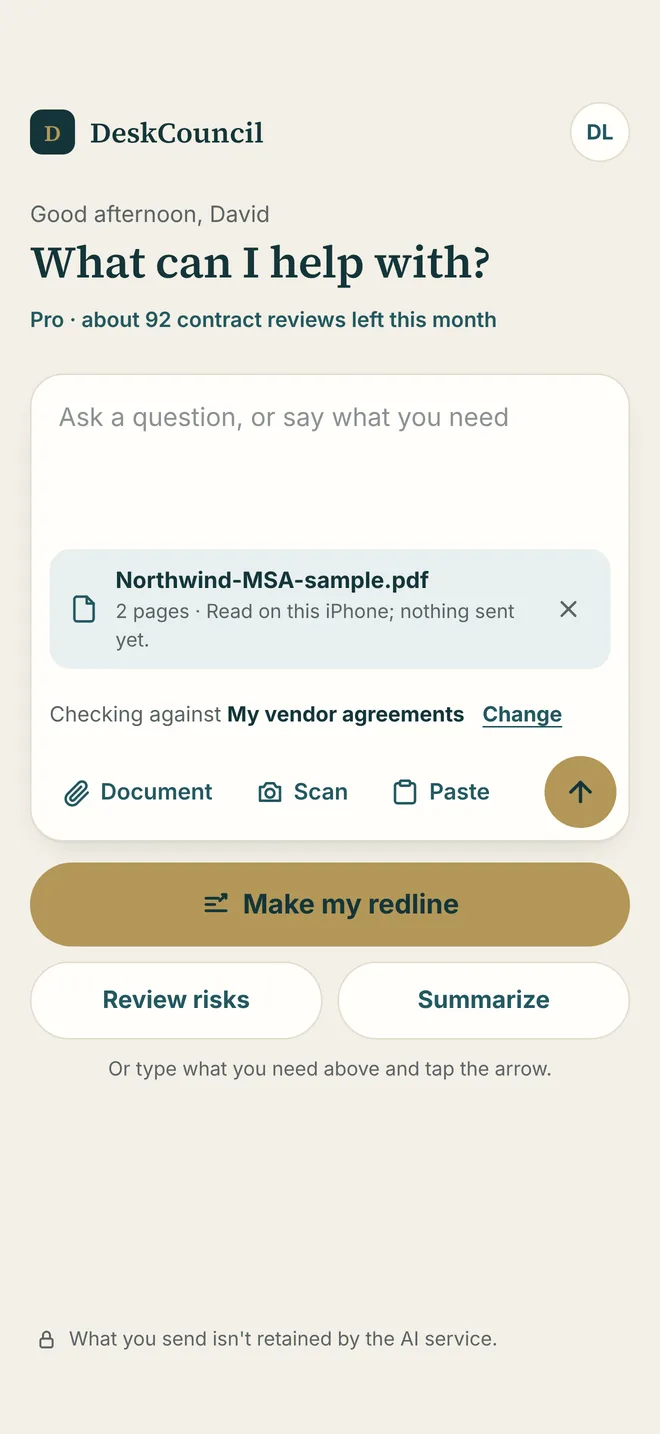
In Mail, Gmail or Outlook, tap the attachment, then Share, then DeskCouncil. Or pick a Word or PDF file from Files, Drive, OneDrive or Dropbox. Paper copy? Scan it with the camera.
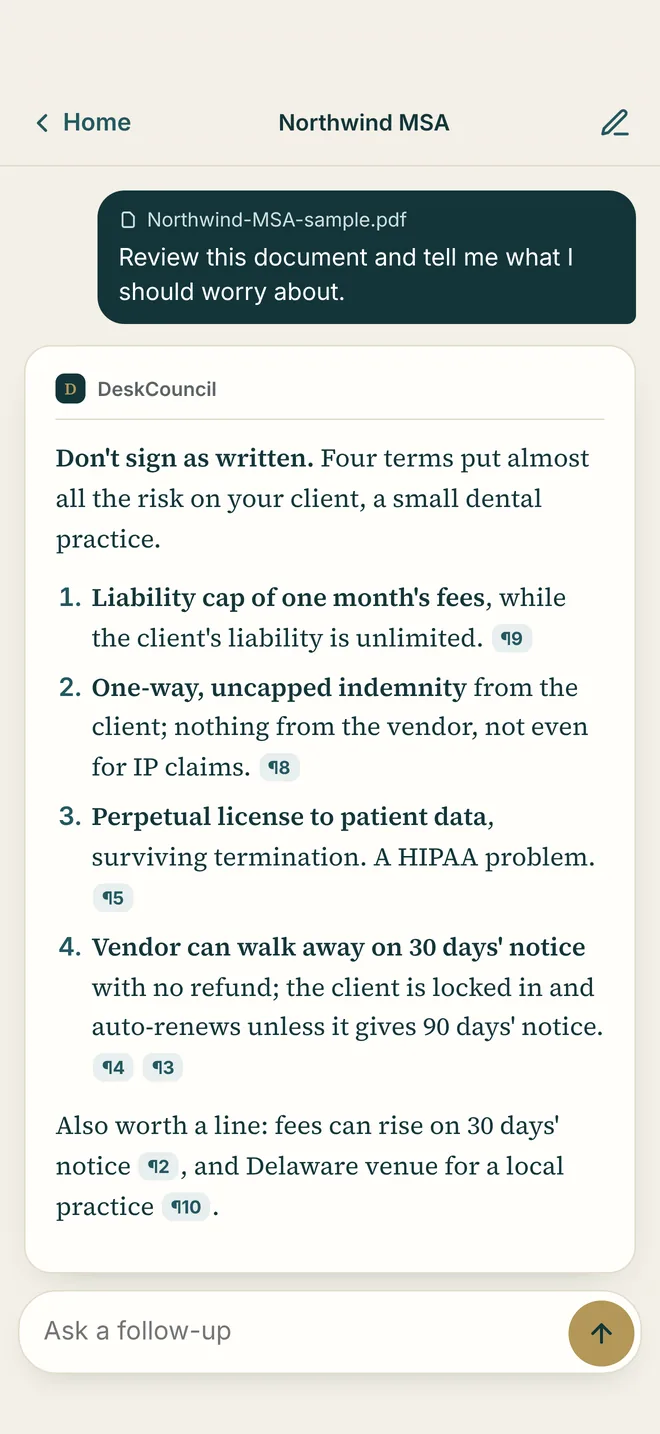
Make my redline, Review risks or Summarize. No prompts to write. You get a verdict first, then numbered findings. Tap any finding to see the exact clause.
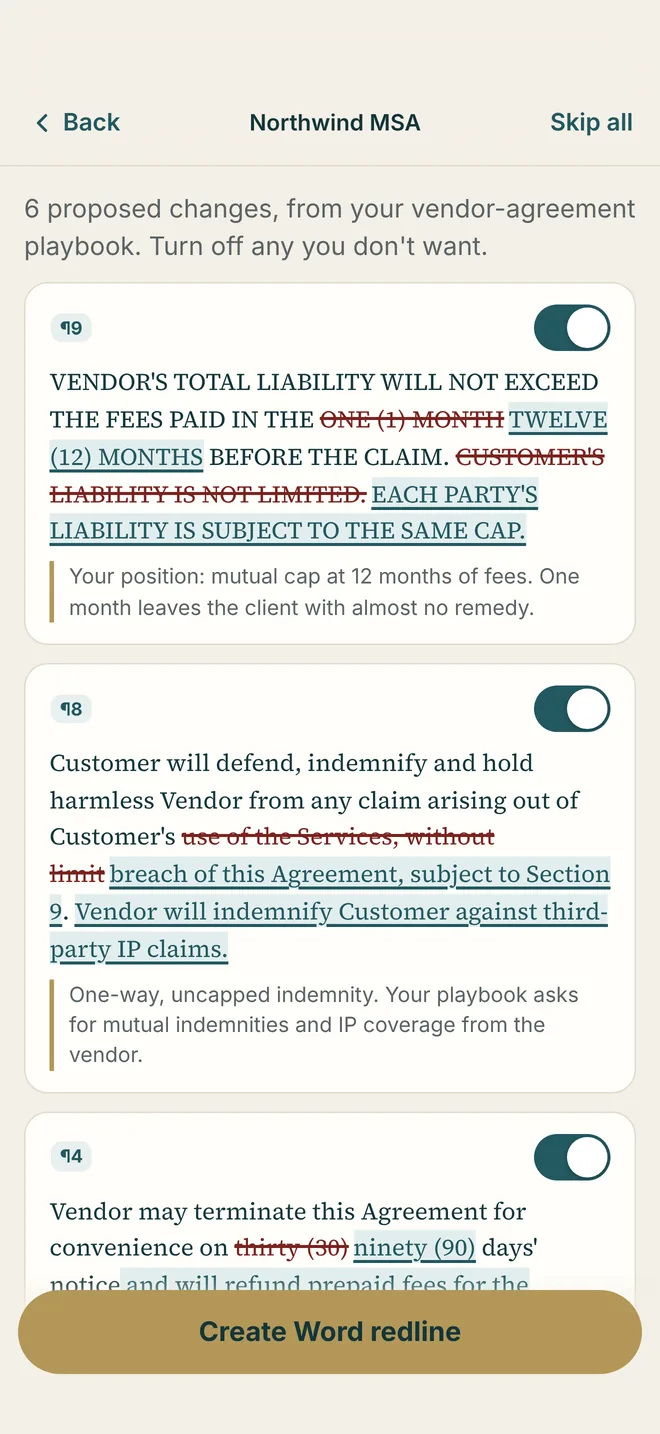
Keep or skip each change, then save a .docx with real tracked changes. Open it in Word on your phone or at your desk, and send it back before the meeting ends.
A verdict, then every risk numbered and ranked, each tied to its clause.
Real tracked changes with the reason for each one. Included in the trial.
Learned from your own agreements. DeskCouncil offers to build one when it sees the second NDA or lease.
Letters, clauses, notices and agreements, starting from your terms.
Real U.S. opinions from CourtListener, the free library run by the Free Law Project. Tap a case to read it.
A reply to opposing counsel, or a plain-language summary for your client.
Point your iPhone camera at a printed agreement. The text is read on the phone.
Legal analysis always goes to the strongest model. Turn on "Always use the strongest model" for everything.
Face ID, optional two-step sign-in, and account deletion right in the app.
A consumer AI chat is a fine writing assistant. Enterprise legal AI is built for large firms. DeskCouncil is built for the lawyer in between.
| Compared on | DeskCouncil | Consumer AI chat ($20 plans) | Enterprise legal AI |
|---|---|---|---|
| Zero data retention | Yes, every request, every plan | No; consumer plans keep your chats | Yes, under an enterprise contract |
| Training on your documents | Never | Possible unless you switch it off | No |
| Your negotiating positions | Playbooks learned from your agreements | You explain them every time | Firm playbooks |
| Word redline | Tracked changes, each with its reason | Possible with careful prompting | Yes |
| Case law | Real opinions from CourtListener | From the model's memory; check every cite | Licensed research databases |
| Price | $29 a month, one lawyer | About $20 a month | About $3,000 per lawyer per year, reported 10-seat minimum* |
| How you start | Download, sign up, try it free | Sign up | Book a demo, sign a contract |
* Enterprise prices are not published. Figures are third-party estimates for Legora from published buyer guides, July to September 2026: TheLawGPT, Vaquill. Consumer retention terms: Anthropic, August 2025; OpenAI data controls. Enterprise legal AI also offers bulk review, Word add-ins and client portals, which DeskCouncil does not.
When someone asks where their contract went, you'll have a plain answer. DeskCouncil is built so there is nothing of theirs on our side to lose.
DeskCouncil reads the document on your device. Only the text a task needs goes to the AI model, and nowhere else.
We use only AI services that don't store your inputs or outputs and don't train on them.
No document library, no upload folder, no copy on our side. Your files stay in your email and your own storage.
Your playbooks and history live in the app on your phone, behind Face ID. Delete your account in the app at any time.
We don't ask you to trust a promise. We built an architecture you can explain.
At $300 an hour, six minutes of your time is worth $30. A single contract review usually takes longer than that to read, mark up and retype as tracked changes. DeskCouncil hands you that first pass in about a minute, in your positions, so your time goes to judgment instead of typing.
And you find out on your own contracts, free, before you pay anything.
Your plan shows what you can do in contract reviews and questions, never in AI costs. If you use up the month's allowance, you choose: add a $10 extra pack, or keep working on a lighter AI model until the month resets. You're never charged more than you approve.
14 days, about 10 contract reviews
See it work on your own contracts. No card needed.
Start freeAbout 40 contract reviews or 100 questions a month
For the solo who reviews a few contracts a week.
Start with SoloAbout 100 contract reviews or 250 questions a month
For busy practices and small firms.
Start with ProAbout 500 contract reviews or 1,250 questions a month
For heavy contract work, with room to spare.
Every plan includesZero data retention, Word redlines, your own playbooks, drafting, email replies, summaries and case-law search.
Month to monthNo seat minimums, setup fees or annual contracts. Cancel in the app or on the website.
Allowances are estimatesThey depend on document length and the task. Unused allowance doesn't carry over.
Already run your own AI account? The Your own key plan is $9.99 a month for the software, and you connect your own DigitalOcean or Vercel account, which bills you for the AI directly. Vercel needs its own Pro plan ($20 a month) for zero data retention; DigitalOcean has no monthly fee. For most attorneys, Solo costs less and needs no setup.
Open it on your phone. Tap Share. Tap DeskCouncil. In about a minute you'll know what's risky, where it is, and what to change, in your own positions, with nothing kept. Try it on a real contract, free for 14 days.
iPhone with iOS 16 or later. Your plan follows you to every device you sign in on.
P.S. The trial includes redlines, playbooks and zero data retention, the same as a paid plan. The only thing it asks of you is one real contract.
DeskCouncil is an AI contract assistant for solo attorneys and small law firms. It reviews contracts, cites the exact clause for every finding, checks agreements against your own playbooks, and produces Word redlines with tracked changes, all from your phone with zero data retention.
DeskCouncil costs $29 a month for Solo or $59 a month for Pro, and every account starts with a free 14-day trial with no card needed. A Power plan at $149 a month arrives with the next app update. There are no seat minimums, setup fees or annual contracts.
DeskCouncil is built so client documents are never kept. The document is read on your phone, only the text a task needs is sent to an AI service with zero data retention, and DeskCouncil stores no client documents on its servers. Whether you need your client's consent is your professional judgment; ABA Formal Opinion 512 is a good place to start.
Zero data retention means the AI service does not store what you send or what it sends back. DeskCouncil uses only AI services that offer zero retention and do not train on your content, on every plan including the trial.
DeskCouncil uses zero-data-retention AI on every request, while consumer AI chat plans keep conversations, typically for 30 days or longer. It also learns your negotiating positions from your own agreements and applies them automatically, so you get a Word redline in your positions without writing a prompt.
No. Your documents are never used to train any AI model, by us or by the AI services we use.
Yes. DeskCouncil writes a standard Word file (.docx) with real tracked changes, and each proposed change shows its reason. Open it in Word on your phone or computer, accept or reject each change, and send it. Redlines are included in every plan, including the free trial.
Yes. Share two or three agreements of one kind that you've negotiated before, such as your NDAs, and DeskCouncil writes down your standard positions as a playbook. Every later review of that kind of agreement starts from your positions, not generic ones.
Legora and Harvey are enterprise platforms for large firms, sold by quote with reported seat minimums that put entry around $30,000 a year. DeskCouncil gives a single lawyer contract review, Word redlines, playbooks and zero data retention, with published prices from $29 a month.
DeskCouncil's case-law search returns real opinions from CourtListener, the free library of U.S. court decisions run by the nonprofit Free Law Project, and you can open each case to read it. In contract reviews, every finding cites the clause it comes from so you can check it.
DeskCouncil runs on iPhone and Android. It appears in your phone's share menu, so you can send it a contract straight from Mail, Gmail, Outlook, Files, Google Drive, OneDrive or Dropbox.
No. DeskCouncil uses large, plain buttons such as Make my redline, Review risks and Summarize. It chooses the right AI model for each task on its own and always uses the strongest model for legal work.
You choose. Add a $10 extra pack, or keep working on a lighter AI model until your allowance resets next month. You are never charged more than you approve.
The Your own key plan costs $9.99 a month and lets you connect your own DigitalOcean or Vercel AI account, which bills you directly for the AI. Vercel requires its Pro plan ($20 a month) for zero data retention; DigitalOcean has no monthly fee. Most attorneys are better served by Solo, which needs no setup.
No. DeskCouncil is a tool for attorneys, not a substitute for one. Every finding cites the document so you can check it, and you decide what goes to the client.
Yes. Plans are month to month. Cancel in the app or on the website, and you keep access until the end of the month you paid for.